Loading
Kindling the Fire…

Deathcounter Overlay

OBS Browser Source · Twitch Free
Checking…
You are not logged in — please sign in to edit your settings

What is this?

Every Death, Counted Live.

A real-time Dark Souls-style death counter for your Twitch stream — works with any game, no software to install.

Runs in the cloud Zero setup time Works with any game

Features

Everything your death counter needs

Just one Browser Source in OBS — ticks up the instant you die, with normal deaths and boss deaths tracked separately.
A faithful recreation of Dark Souls 3's death screen, with your own custom text if you want it.
Adjust the counter straight from Twitch chat with !death, !bossdeath and more — mods, VIPs or everyone, your choice.
Play a sound on every death straight from your browser source — pick from the built-in library or upload your own.
One-click URLs for adding, undoing or resetting deaths — drop them onto any Stream Deck or macro app.
Counters save separately for every game and switch automatically when your Twitch category changes.
2

Death Sounds

Manage Deathsounds

NEW

Every death plays one random sound picked from whatever's enabled below — the global library and your own uploads share the same pool. Toggle anything off to pull it out of rotation. Requires a valid streamer first.

Chat Bot

Command Prefix

Set the prefix your chatbot listens for (e.g. ? or c!). Max 2 characters — no / or spaces.

3

Access Control

Chat Commands

Turn individual commands on or off and choose who can use each one — the broadcaster always has access unless a command is fully switched off.

On Mods VIPs Viewers
Deaths
!death Increase deaths by 1
!d
!death- Decrease deaths by 1
!d-
!setdeaths <n> Set deaths to a specific value
!setd!sd
!counter Show current counter in chat
!c
Boss Deaths
!bossdeath Increase boss deaths by 1 (also counts as a death)
!bd
!bossdeath- Decrease boss deaths by 1
!bd-
!setbossdeaths <n> Set boss deaths to a specific value
!setbd!sbd
Reset
!reset Reset all deaths & boss deaths to 0
!resetgame!gamereset
!resetdeaths Reset only deaths to 0
!resetd!rd
!resetbossdeaths Reset only boss deaths to 0
!resetbd!rbd
Stats
!lastdeath Show time since the last death in the current game
!ld!lastd
!survival Show current survival streak & personal record
!alive!streak
!alldeaths Show top 3 games by deaths & overall total
!topdeaths!graveyard!deaths
Bot
!invite Share the bot's invite link — works for anyone, in any channel Everyone
!leave Remove the bot from your channel Broadcaster only
4

Live Overlay

Customize overlay

Choose what to show in your OBS overlay. Changes apply live.

👁️ Visibility
🧭 Layout
🎨 Appearance
💀 You Died Text

Max 50 characters.

5

OBS Browser Sources

OBS Browser Source URLs

Copy these links into OBS as Browser Sources. The link stays the same — only your settings change live.

6

Remote Control

Stream Deck & Mobile

Optional

Count deaths with one physical button — no typing in chat. Assign URLs to your Stream Deck, bookmark on mobile, or use any tool that can open a URL.
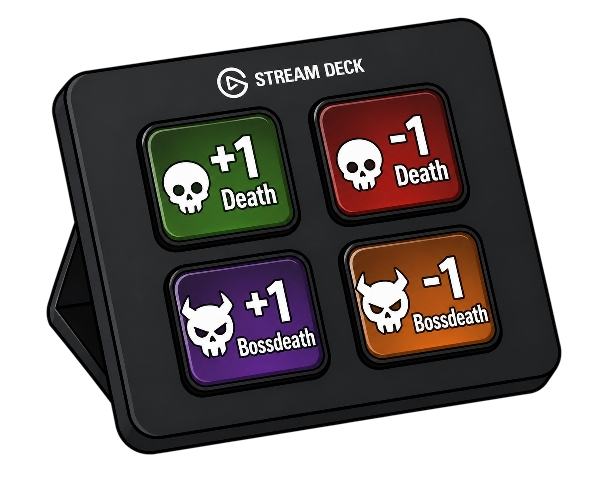
Stream Deck
🎮 Stream Deck
1Add a Website Action to any key
2Paste one of the URLs below as the target
3Press during stream — overlay updates instantly
📱 Mobile
1Copy a URL & bookmark it on your phone
2Tap to trigger — no login needed on device
3iOS: use Shortcuts app to make a home widget
+1 Death
−1 Death
Reset Deaths sets deaths to 0
+1 Boss Death also counts as +1 death
−1 Boss Death also counts as −1 death
Reset Boss Deaths sets boss deaths to 0
Full Reset deaths + boss deaths → 0
7

Per-Game Breakdown

Current Deaths

Your currently saved death count for every game you've played. Login to see your stats.

8

Death Timeline

Statistics

How your death count has moved over time.
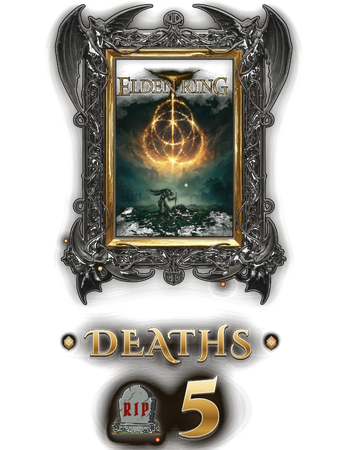
Counter Overlay
Example overlay preview
Login via Twitch to see the preview.
Demo
You Died Overlay
YOU DIED
Idle

Set browser source to full resolution (e.g. 1920×1080) · Plays the exact same animation as your live overlay — same code, same timing, same sound

Logged in as via Twitch